Updates
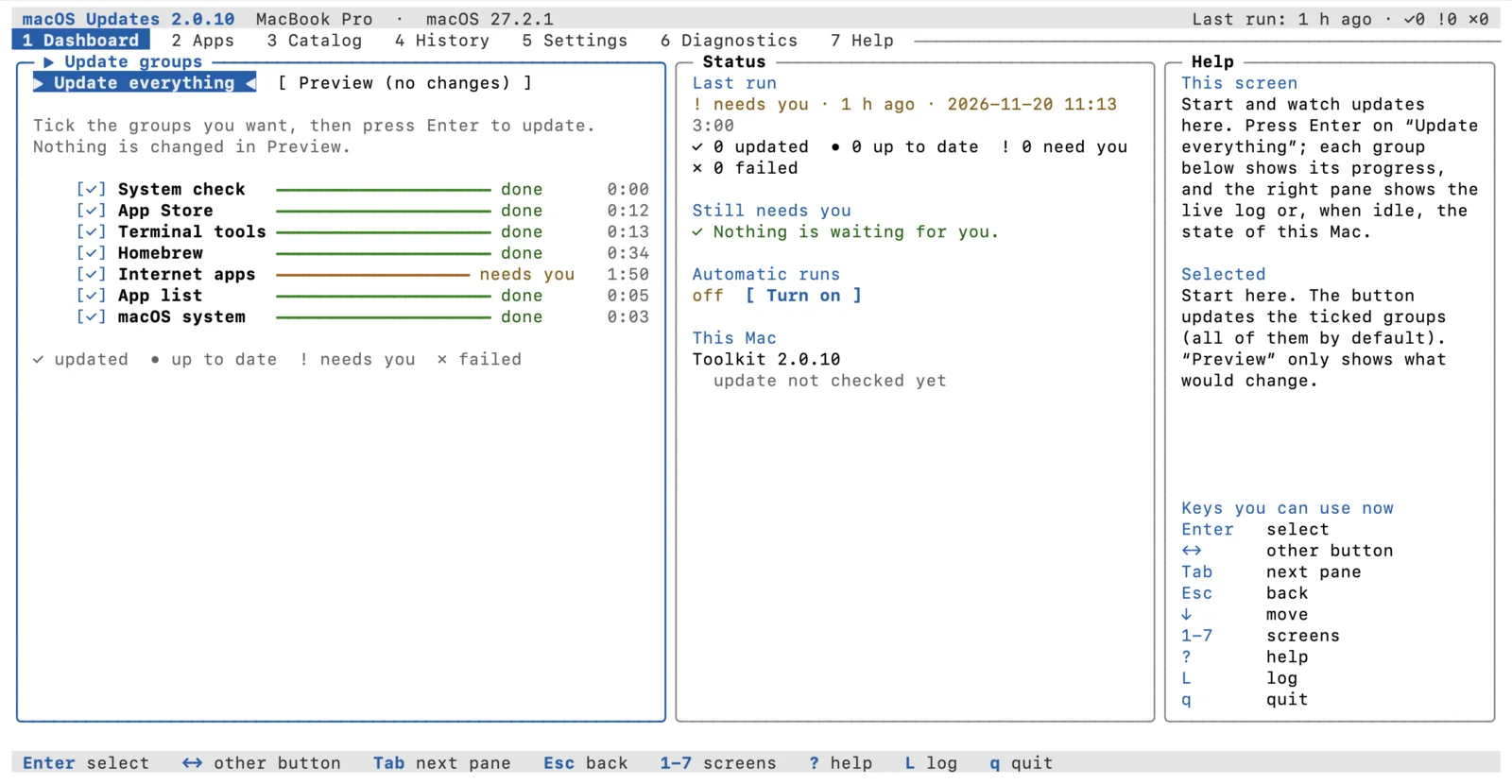
mac-update
- Automatic, in one command
- One run updates App Store apps, terminal tools (npm, bun and native command-line tools), Homebrew formulae and casks, and internet apps. It then refreshes the app list and updates macOS last. There is nothing to approve app by app.
- Terminal interface
- Tabs for Dashboard, Apps, Catalog, History, Settings, Diagnostics and Help, with live progress for every group and every app. Arrow keys, Enter, Tab and Esc work, and so does the mouse. Accent colour themes change the look.
- A result you can act on
- The result screen lists what was Updated, what was Up to date and what Needs you. Every item that needs you comes with a reason and a suggested action.
Control
- Per-app tuning
- Set any app to automatic, manual (check and report only) or skip, and pick a preferred source where an app has more than one.
- Automatic recognition
- The toolkit works out how each installed app is updated from an App Store receipt, Homebrew, a built-in updater or its tested list. Unknown apps become manual and never block the rest.
- Optional automatic runs
- Run at login or daily. Off by default, and you choose in Settings. A run ends with one summary notification. A scheduled run never waits for an answer and skips the macOS system update unless you enable it; anything that needs your password or a restart is reported instead.
Safety & setup
- Safe by default
- Apps you have open are never closed. Downloads must come from an allowed host and pass a code signature check and Gatekeeper. Nothing is installed that is not already on your Mac, unless you choose it from the Catalog. One failure never stops the rest.
- One-command install
- The installer downloads a tagged release package, verifies its SHA-256 checksum, needs no sudo and adds the mac-update command. Uninstalling is one command too.
- Seven languages
- The interface and messages are available in English, Polish, German, French, Spanish, Italian and Portuguese.
- Apple Silicon focus
- Designed for arm64 Macs running macOS 13 or later. Intel Macs are not supported.
- Local data
- Your app list, settings, per-app choices and run history are stored on your Mac.
What is in this release
What macOS Updates does, and what it deliberately does not do.
Included
- One command updates App Store apps, terminal tools, Homebrew formulae and casks, internet apps, the app list and macOS, in that order
- A terminal dashboard with live per-group and per-app progress, and a result screen with Updated, Up to date and Needs you
- Per-app tuning: automatic, manual or skip, plus a preferred source
- Automatic recognition of how each app is updated; unknown apps become manual
- Optional automatic runs at login or daily, off by default, with one summary notification
- One-command install with a verified release package and no sudo; one-command uninstall
Limits
- Apps you have open are never closed; they are reported as Needs you
- Nothing is installed that is not already on your Mac, unless you pick it from the Catalog
- Downloads are accepted only from allowed hosts, with a valid code signature and Gatekeeper approval
- An app that cannot be updated safely becomes manual and is reported with a suggested action
- A scheduled run never waits for a password; it reports the step instead
- Apple Silicon only. Intel Macs are not supported