
Updates. On your terms.
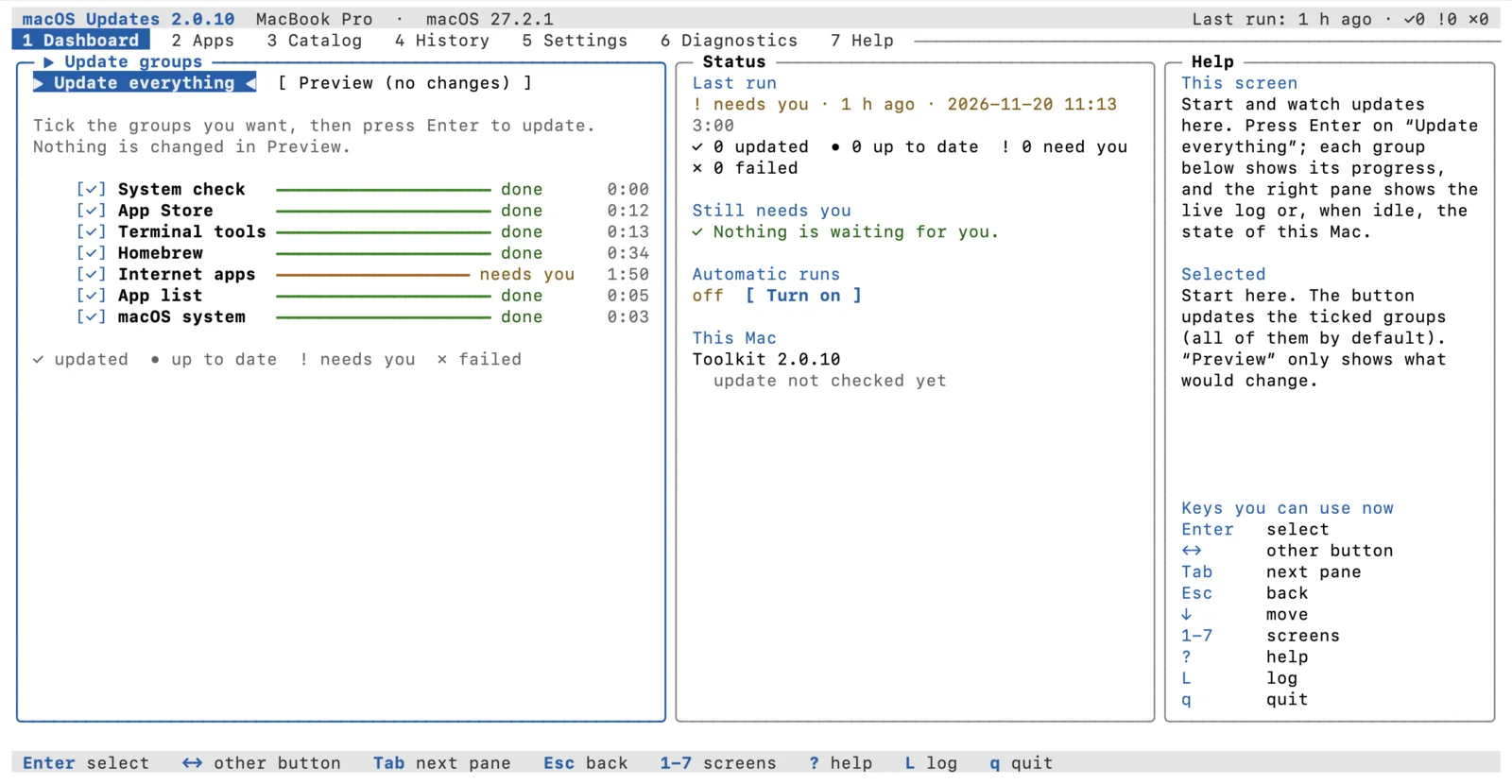
One command updates the App Store, terminal tools, Homebrew and internet apps, then macOS last. Live progress in Terminal, nothing to approve app by app.
Original illustration. The toolkit supports modern Apple Silicon Macs running macOS 13 or later.
Every app has its own way.
macOS Updates recognises available update methods. Unrecognised apps are reported for manual attention. It never closes an app you have open, and what it cannot do safely it hands back to you with a reason.
These describe the run order and the interface, not benchmarks.
One command. The whole picture.
See the dashboard, manage apps and explore the tools available in the Terminal interface. The views show selected installed apps and history. The demo previews internet apps and macOS, finding one available app update without installing it.
One command. A clear result.
Install with one command, open the interface and run. Preview shows what would change without installing anything. macOS comes last.
Check readiness
A read-only report checks the platform, tools, disk space, power and network before you run anything.
mac-update doctorCommand examples. This website never scans your computer or runs updates.Check. Update. Ready.
How each app is updated.
macOS Updates recognises known update methods and reports unknown apps for manual attention. You can adjust individual apps.
Apps it keeps up to date
A sample of the apps and tools the toolkit knows how to update. Unrecognised apps are reported for manual attention.
Browsers



AI and coding













Productivity and media










Security, cloud and network












Tools and stores





Product names and logos are trademarks of their respective owners. They are shown only to identify software the toolkit can update, with no endorsement implied. Icon credits: selfh.st/icons (CC BY 4.0), Simple Icons (CC0), Lobe Icons (MIT).
How an app is recognised
- App Store receipt
- Apps bought or installed from the App Store are updated through the store.
- Homebrew
- Formulae and casks are updated by Homebrew itself.
- Built-in updater
- Apps that carry their own updater are updated through it.
- Tested list
- Apps on the toolkit’s tested list are updated by the method that was tested for them.
- Unknown apps
- If an app is not recognised, it becomes manual. It is reported with a suggested action and never blocks the rest of the run.
Tune any app
automatic- The toolkit updates it. This is the default.
manual- The toolkit only tells you when an update is waiting.
skip- The toolkit leaves the app alone.
Where an app has more than one source, you can also pick a preferred one: Homebrew, App Store or the vendor’s website. The app’s own updater is also a supported update method.
What one run covers, in order
- App StoreApps from the App Store.
- Terminal toolsnpm, bun and command-line tools that update themselves.
- HomebrewFormulae and casks.
- Internet appsApps you downloaded from a maker’s website: vendor feed, verified direct download or the app’s own updater.
- App listThe list of your apps is refreshed.
- macOSThe system update, always last.

/bin/bash -c "$(curl -fsSL https://github.com/KasprowiczM/macOS_updates/releases/latest/download/install.sh)"mac-update doctormac-update doctor --fixmac-updatemac-update uninstallBack to your own things.
One command, a fixed order and the result at the end. Keep your time for what you want to do on your Mac.
Start in Terminal
Scroll inside the window to see all five commands.
Instructions and requirementsThe installer downloads a tagged release, verifies its SHA-256 checksum, needs no sudo and adds the mac-update command. Select Preview, then Update everything. Prerequisite repair asks for consent before making changes.
The toolkit is free. Support is optional.
Support development